使用hadoop+中文分词统计小说里的用词频率
事情是这样的, 某小说贴吧吧友开玩笑说 某作者最常使用的词语是xxxx , 然后就突发奇想地想用工具分析一下
环境
系统: ArchLinux
软件: hadoop 2.7
准备
下载hadoop: 下载地址
下载分词插件: 下载地址
1.解压hadoop-2.7.0.tar.gz: tar cxf hadoop-2.7.0.tar.gz
我的解压到
/home/ystyle/Applications/hadoop-2.7.0下面了(我下载时是hadoop-2.7.0.tar.gz)
2.设置环境变量
vim ~/.bashrc
export HADOOP_INSTALL=/home/ystyle/Applications/hadoop-2.7.0
export PATH=$PATH:$HADOOP_HOME/bin:$HADOOP_HOME/sbin
然后再执行 source ~/.bashrc
PS: 这里使用hadoop的单机模式
代码
package net.ystyle.hadoop;

import org.apache.hadoop.conf.Configuration;
import org.apache.hadoop.fs.Path;
import org.apache.hadoop.io.IntWritable;
import org.apache.hadoop.io.Text;
import org.apache.hadoop.mapreduce.Job;
import org.apache.hadoop.mapreduce.Mapper;
import org.apache.hadoop.mapreduce.Reducer;
import org.apache.hadoop.mapreduce.lib.input.FileInputFormat;
import org.apache.hadoop.mapreduce.lib.output.FileOutputFormat;
import org.apache.hadoop.util.GenericOptionsParser;
import org.wltea.analyzer.core.IKSegmenter;
import org.wltea.analyzer.core.Lexeme;

import java.io.IOException;
import java.io.StringReader;

public class WordCount {

  public static class TokenizerMapper
       extends Mapper<Object, Text, Text, IntWritable>{

    private final static IntWritable one = new IntWritable(1);
    private Text word = new Text();

    public void map(Object key, Text value, Context context
                    ) throws IOException, InterruptedException {
        IKSegmenter iks = new IKSegmenter(new StringReader(value.toString()), true);
        Lexeme t;
        while ((t = iks.next()) != null) {
            word.set(t.getLexemeText());
            context.write(word, one);
        }
    }
  }

  public static class IntSumReducer
       extends Reducer<Text,IntWritable,Text,IntWritable> {
    private IntWritable result = new IntWritable();

    public void reduce(Text key, Iterable<IntWritable> values,
                       Context context
                       ) throws IOException, InterruptedException {
      int sum = 0;
      for (IntWritable val : values) {
        sum += val.get();
      }
      result.set(sum);
      context.write(key, result);
    }
  }

  public static void main(String[] args) throws Exception {
    Configuration conf = new Configuration();
    String[] otherArgs = new GenericOptionsParser(conf, args).getRemainingArgs();
    if (otherArgs.length < 2) {
      System.err.println("Usage: wordcount <in> [<in>...] <out>");
      System.exit(2);
    }
    Job job = Job.getInstance(conf, "word count");
    job.setJarByClass(WordCount.class);
    job.setMapperClass(TokenizerMapper.class);
    job.setCombinerClass(IntSumReducer.class);
    job.setReducerClass(IntSumReducer.class);
    job.setOutputKeyClass(Text.class);
    job.setOutputValueClass(IntWritable.class);
    for (int i = 0; i < otherArgs.length - 1; ++i) {
      FileInputFormat.addInputPath(job, new Path(otherArgs[i]));
    }
    FileOutputFormat.setOutputPath(job,
      new Path(otherArgs[otherArgs.length - 1]));
    System.exit(job.waitForCompletion(true) ? 0 : 1);
  }
}
本代码改自hadoop自带的wordcount: 源码在
hadoop/share/hadoop/mapreduce/sources/hadoop-mapreduce-examples-2.7.2-sources.jar类名为org.apache.hadoop.examples.WordCount这里只改了map方法添加了IK分词
在IDEA里创建项目
- 创建普通项目
- 按
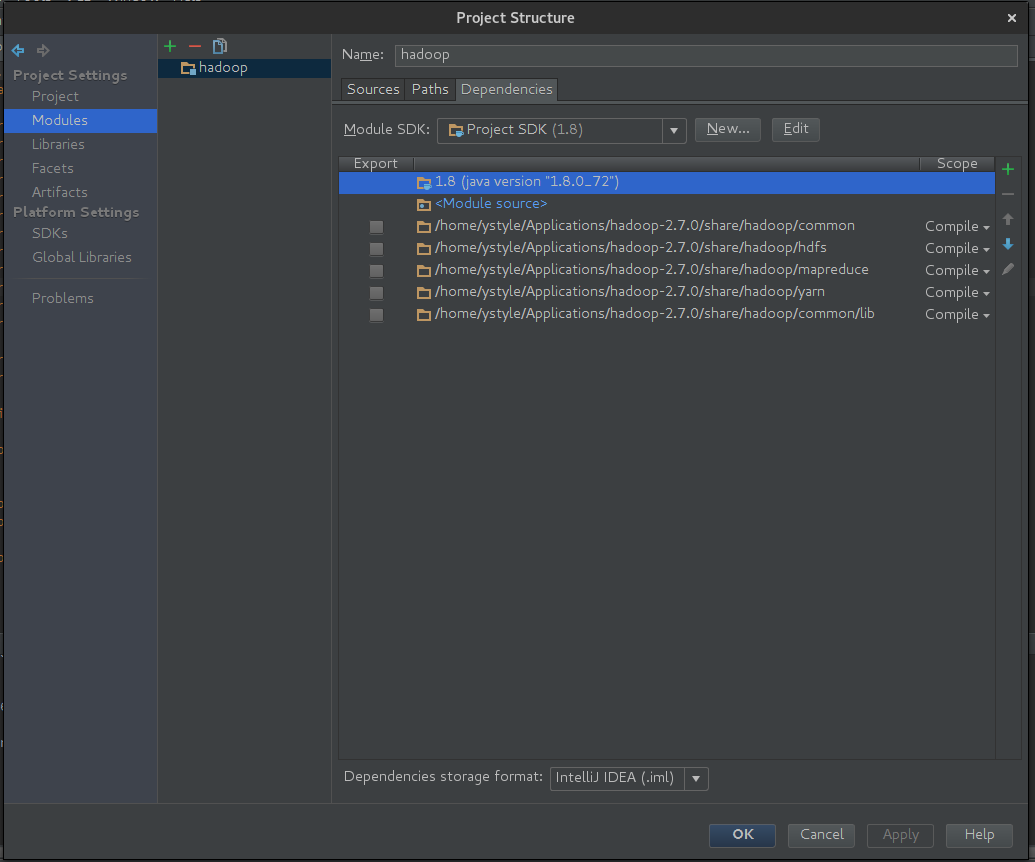
shift + alt + ctrl + s进入项目设置, 选择Modules-Dependencies添加hadoop/share/hadoop/目录下的commonhdfsmapreduceyarncommon/lib到Dependencies下 - 把下载的ik分词jar放
hadoop/share/hadoop/mapreduce目录下
如图:
运行
- 把下载的小说放
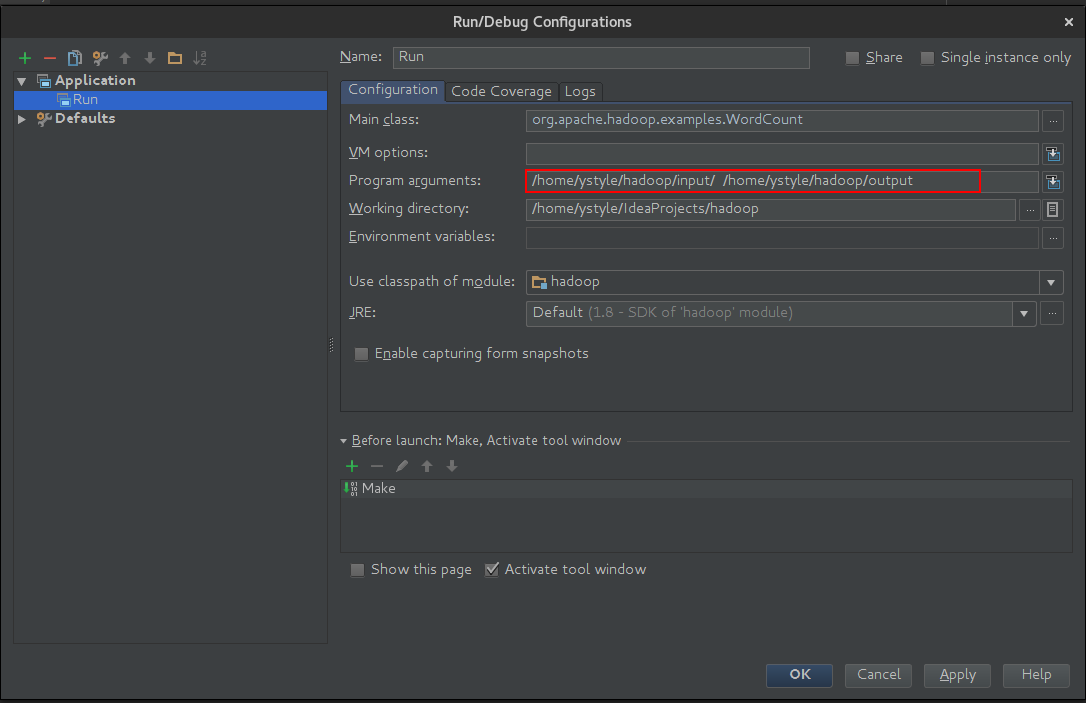
/home/ystyle/hadoop/input下面 - 在IDEA的
Run/Debug Configurations里的Program arguments里填上
/home/ystyle/hadoop/input /home/ystyle/hadoop/output - 近按
Shift + F10运行, 等待结果
结果分析
我分析的小说为«我欲封天»
cd /home/ystyle/hadoop/output结果在文件part-r-00000里- 先把结果按使用次数排序并存在
0.txt里:sort -k2rn part-r-00000> 0.txt - 分析两字词语的使用次数:
awk '{if(length($1)==2) print $0}' 0.txt > 2.txt - 分析四字词语的使用次数:
awk '{if(length($1)==4) print $0}' 0.txt > 4.txt
部分结果如下
两字词语
在这	9889
此刻	9000
一个	8819
立刻	8676
身体	8338
到了	7906
出现	7504
他们	7382
修士	7350
四周	7104
四字词语
与此同时	1443
中年男子	1089
轰的一声	1048
未完待续	893
惊天动地	853
面色苍白	752
前所未有	481
兄弟姐妹	421
无法形容	408
毫不迟疑	390